
Six candidate states. One calm process.
A clear, state-machine-driven recruitment workflow — so every interview, decision and notification happens automatically, in order, without you needing to chase anyone.
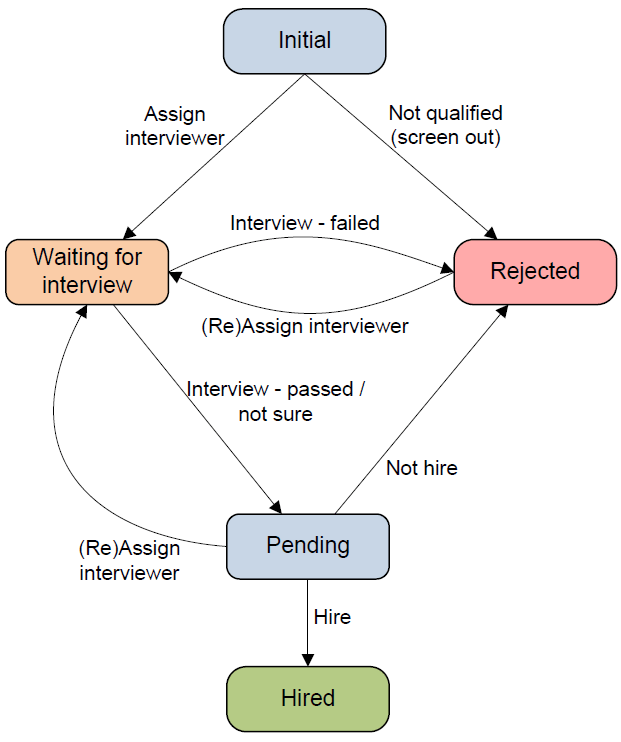
Only six states, you're ready to go
When an applicant applies for an opening, the first state is Initial — assign an interviewer or screen them out if not qualified. If the applicant passes, schedule round-2 or round-3 interviews to gather the data you need before the hire-not-hire decision.
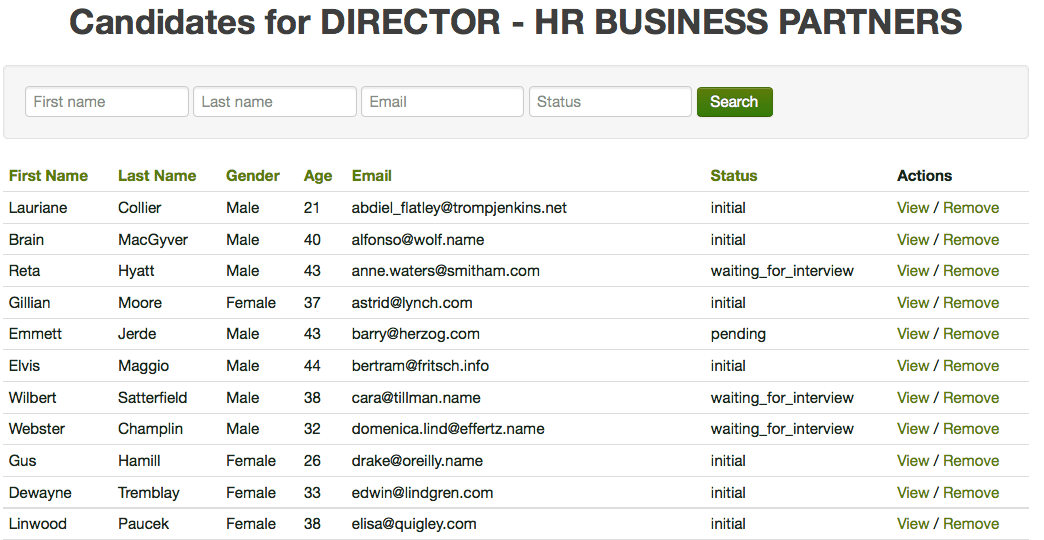
You can search all your candidates by state at any time.
Make the call — we'll handle the rest
Your decisions trigger email notifications to interviewers and opening owners automatically. Stuck candidates surface to recruiting managers so they can take action and keep the pipeline moving. Learn more.
Candidate states and interview / recruiting decisions
| State | Description | Possible Actions |
|---|---|---|
| Initial | The state that the applicants have just applied for the job opening; Or the state that you have just add a passive candidate from talent pools. |
|
| Waiting for interview | The state that the applicant(candidate) needs to be interviewed. |
|
| Waiting for interview | The state that the applicant(candidate) needs to be interviewed. |
|
| Pending | The state that the hire-or-not-hire decision needs to be made, or a new interviewer needs to be assigned for the candidate if more information is needed. |
|
| Hired | The state indicates the candidate passed all interviews and get hired | None. |
| Rejected | The state indicates the candidate failed interviews or not qualified for the position |
|
Manage applicants and candidates by recruiting state
Great candidates are hard to find. You don't want a heavy, lengthy recruitment process driving them away — and our system makes it easy to spot the candidates who need your attention right now.
- Filter candidates by state to find the "pending" ones who need a decision — schedule another round, hire, or reject;
- Find candidates whose status hasn't been updated in a while, investigate the cause and improve the recruitment process.
Visit our product page and feature page to learn more.
Hire calmer, hire faster.
Free 12-month trial. No credit card. Set up takes minutes.
Start free See features